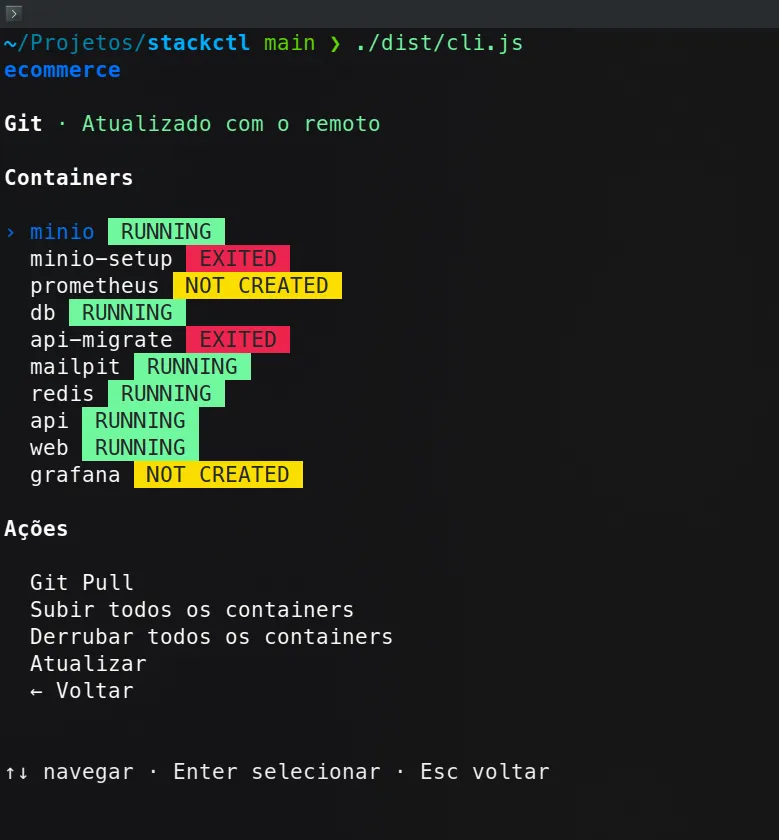
Docker stack operations in the terminal: local TUI with git and Compose
I built a terminal panel to operate several local repositories: git pull, Docker Compose, container status, and logs, with no HTTP or authentication. The UI is React with Ink and the backend calls git and docker on the host, with a safe path under PROJECTS_ROOT and a fallback when Compose fails. The build produces a single binary (~1.8 MB) installable via npm link.
Technical context
I chose a pure CLI instead of a web panel: the process runs where the projects live, talks to git and docker on the host, and opens neither a port nor authentication. The interface is React with Ink (full-screen context switch between list, dashboard, and logs); domain logic lives in modules that resolve the project path, read Compose, act on services, and classify Git sync. Bundled with esbuild into a single cli.js with a shebang, so it installs with npm link without depending on an asset server.
Engineering challenges (how and why)
- Path under PROJECTS_ROOT: I resolve the project directory and reject any path outside the configured root before running git or Compose, to avoid traversal by folder name.
- Resilient Compose inventory: I discover
compose.yaml/ymlanddocker-compose.*, pass--env-file .envwhen it exists, and ifcompose psbreaks (incomplete env, for example) I fall back todocker psfiltered by the Compose project label. - Services vs real containers: I list Compose services (or parse the YAML) and merge with Docker state; a service without a container shows as “not created”, and start/stop/restart only accept names that exist in the list.
- Git with sync status: I
fetch, read porcelain, and compare@{upstream}...HEADto mark up to date, behind, diverged, or no upstream, in parallel with reading containers. - Destructive actions with confirmation: pull, up/down, start/stop/restart, and volume cleanup go through Y/n; clearing volumes stops the service, deletes named volumes and binds, and only then reports the result.
- Container details without races: when focusing a service, I inspect ports, volumes (with size), and image with a request id, discarding late responses if the user already changed selection.
Known limit
Logs are a snapshot of the last 100 container lines, not a live stream in the terminal.
- Ink
- React
- TypeScript
- Docker Compose
- Git
- esbuild